
582 字
3 分钟
PowerShell-7的简单配置
起因
Windows平台下的默认的终端是究极远古老祖cmd和powershell 5(以下简称PS)。后来本人在一次偶然的情况遇上了PS 7。
因为up主在vscode中使用copilot的时候,能够实现在输入部分不完整指令的情况下,能够出现指令的待选列表,就像是code时,IDE提供的LSP补全一样,非常好的好用(‾◡◝)
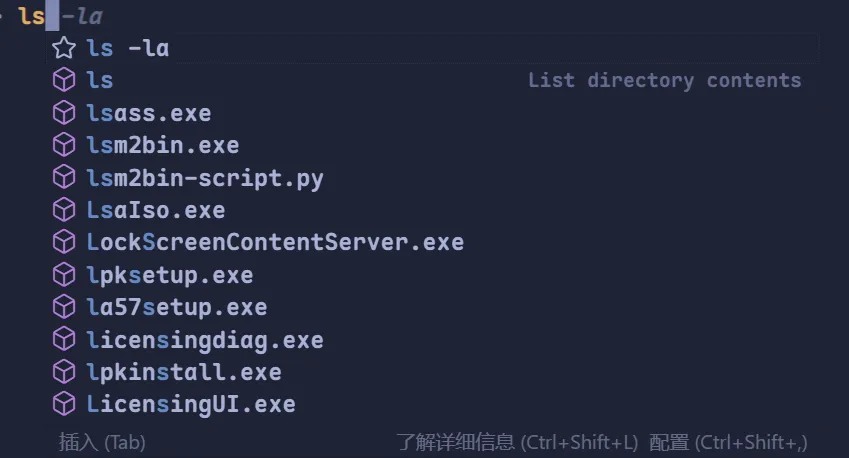
但是up在后来使用cursor的时候却发现,同样在启用terminal.integrated.suggest.enabled设置时,我的cursor却不能够正常开启该功能🥲
后来查阅资料发现,cursor对于这项功能的支持,只适用于PS 7(截至截稿时)。所以up通过winget包管理工具安装了PS 7。
winget install --id Microsoft.PowerShell --source winget在使用PS 7的时候发现powershell的预测性输入非常的好用,只需要按下→即可选中,同时不耽误原本的基础的Tab自动补全。~( ̄▽ ̄)~*
脚本
通过改写$PROFILE文件实现自启动的一些功能。
edit.exe $PROFILE这里的edit是一种终端编辑器,大家可以换成记事本或者其他编辑器
# 设置控制台为 UTF-8 编码$OutputEncoding = [console]::InputEncoding = [console]::OutputEncoding = New-Object System.Text.UTF8Encoding
# 注册 winget 参数补全Register-ArgumentCompleter -Native -CommandName winget -ScriptBlock { param($wordToComplete, $commandAst, $cursorPosition) [Console]::InputEncoding = [Console]::OutputEncoding = $OutputEncoding = [System.Text.Utf8Encoding]::new() $Local:word = $wordToComplete.Replace('"', '""') $Local:ast = $commandAst.ToString().Replace('"', '""') winget complete --word="$Local:word" --commandline "$Local:ast" --position $cursorPosition | ForEach-Object { [System.Management.Automation.CompletionResult]::new($_, $_, 'ParameterValue', $_) }}
# 启用git touch命令function touch { param($name) New-Item -Path $name -ItemType File -Force }
# 启用git模块#Import-Module posh-git
# 第一次使用git命令时加载$script:PoshGitLoaded = $falsefunction git { if (-not (Get-Module posh-git)) { Import-Module posh-git -ErrorAction SilentlyContinue if (-not $script:PoshGitLoaded) { Write-Host "[posh-git 已启用]" -ForegroundColor Green $script:PoshGitLoaded = $true } } & git.exe @Args}
function Enable-EnvProxy { $proxy = "http://127.0.0.1:7890" $env:http_proxy = $proxy $env:https_proxy = $proxy Write-Host "环境变量代理已开启:$proxy"}
function Disable-EnvProxy { Remove-Item Env:http_proxy -ErrorAction SilentlyContinue Remove-Item Env:https_proxy -ErrorAction SilentlyContinue Write-Host "环境变量代理已关闭"}
# 开机自启动代理Enable-EnvProxy
# posh主题oh-my-posh init pwsh --config "$env:POSH_THEMES_PATH\agnoster.minimal.omp.json" | Invoke-Expression现在实现了一下功能:
- 终端自动设置的代理端口
- 使用
UTF-8编码 winget的Tab补全- 按需启动
Git模块(在第一次输入git指令的时候才开启) - 方便的
touch函数 oh-my-posh的主题(已被注释)
希望能够帮到大家(≧︶≦))( ̄▽ ̄ )ゞ
PowerShell-7的简单配置
https://best-joker.github.io/best-joker/posts/powershell-7的简单配置/